How to Get Claude to Do Exactly What You Want Before a Developer Writes One Line
Most founders get poor results from Claude not because the model is bad, but because their instructions are. Here's what to fix before you build.
Ellen Minh Nguyen
Author
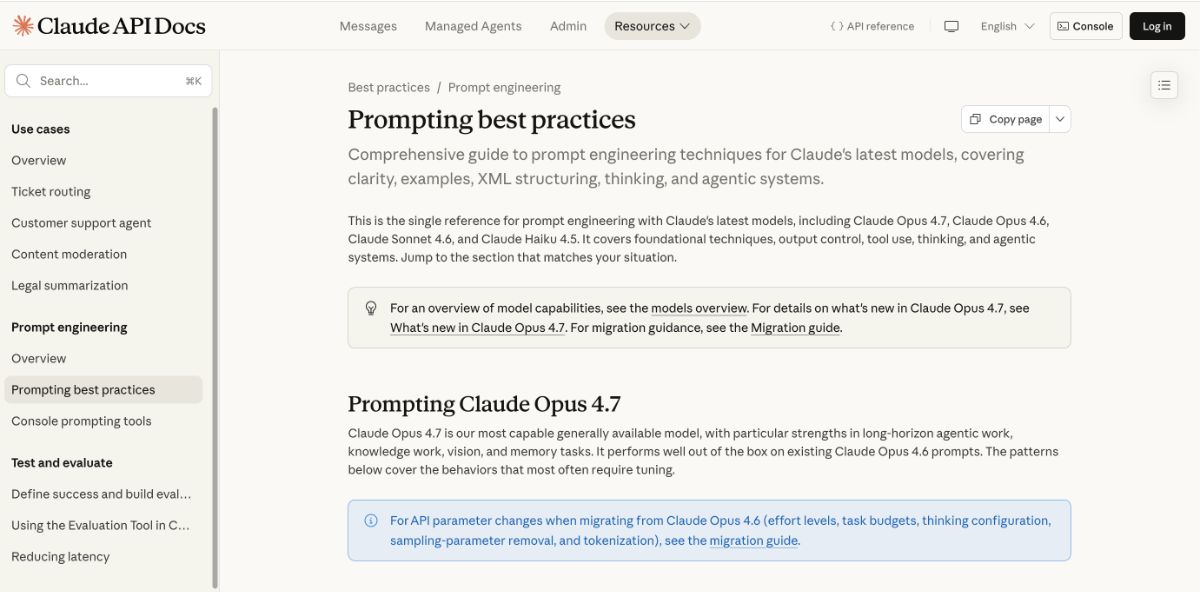
The instructions you give Claude matter more than the model version you pick. Most founders learn this the hard way.
This is for non-technical founders evaluating Claude for a product in 2026 — before you've hired a developer or signed any API (Application Programming Interface, the technical connection between your product and Claude) contracts. It covers five practical patterns from Anthropic's official prompting documentation. It doesn't cover which Claude model to choose, how to set up the integration, or how to compare Claude to other tools. Those are second-order decisions that only make sense after you've got the basics right.
What does a "prompt" actually mean, and why does it determine so much?
A prompt (the instruction you send to Claude before it responds) is the single variable you control. Claude has no knowledge of your business, your customers, your tone preferences, or what "good" looks like for your specific use case. It works entirely from what you put in that instruction.
Anthropic's documentation describes it this way: think of Claude as a brilliant but new employee who lacks context on your norms and workflows. The more precisely you explain what you want, the better the result. Leave gaps and Claude fills them with its best guess, which often doesn't match what you had in mind.
Try your self: Try 2 prompts below in claude and see the difference
- Prompt 1: What is claude code?
- Prompt 2: Give the the key takeaways of claude code, knowing that I am a non-technical founder who wants to apply claude code in my business
A system prompt (a set of standing instructions Claude reads before every conversation in your product) is the equivalent of an employee handbook. It applies to every interaction automatically. Any product built on Claude should have one, and the quality of that document shapes every response your users ever see.
Why does vague input always produce vague output?
Claude doesn't infer what you didn't say. This causes most of the disappointing results founders report. Ask Claude to "write a summary" and it'll write a summary. But it has no idea whether you want three bullet points or three paragraphs, formal or casual, focused on decisions or background context.
Anthropic's documentation offers a useful test for this. Before sending an instruction to Claude, show it to a colleague with zero context on your task and ask them to follow it. If they'd be confused, Claude will be too. That single test catches most poorly written prompts before they produce poorly written output.
Same principle applies to format. If your product shows Claude's responses in a mobile interface with limited space, say so. If you need Claude to respond in a specific structure, describe that structure. Claude calibrates its response to what you ask — not to what you hoped it would figure out on its own.
What are the five habits that make Claude more useful?
These five patterns come from Anthropic's own prompting documentation (published for Claude Opus 4.7, the most capable model in the Claude family as of May 2026). They apply regardless of which version your developer uses.
1. Be specific about what you want — including format and length
"Create an analytics dashboard" produces a generic result. "Create an analytics dashboard with five key metrics, a monthly trend chart the user can filter by region, and a table of the top ten transactions" produces something usable on the first try. Describe the output the same way you'd brief a designer: include format, scope, audience, and any constraints.
2. Give Claude the reason behind your request
When you explain why you want something, Claude uses that reasoning to handle edge cases you didn't anticipate. "Never use ellipses" is a bare command. "Never use ellipses — this text will be read aloud by a text-to-speech system that won't know how to pronounce them" (an example from Anthropic's documentation) gives Claude logic it can apply to situations you didn't spell out. In my experience testing this, the instruction with a reason produces usable output on the first try. The bare command needs two or three rounds of correction.
3. Show examples of what good output looks like
Two or three concrete examples of the output you want cut mistakes more reliably than paragraphs of rules. These examples (sometimes called "few-shot prompting" — showing a few examples upfront so Claude can match the pattern, the way you'd show a new hire a sample report before asking them to write one) work because Claude is exceptionally good at pattern recognition. Make your examples as close to your real use case as possible.
4. Give Claude a specific role
A single sentence in your setup changes how Claude behaves for every response: "You are a customer support specialist for a business-to-business software company. Your tone is professional but warm, and you never make commitments about refunds without escalating to a human agent." That sentence sets the register, scope, and constraints for everything that follows. Without it, Claude picks a general-purpose tone that may not fit your product at all.
Not optional.
5. Tell Claude how thorough to be — and why it matters for your costs
Claude has an effort level (how intensely it thinks through a problem before responding) that your developer can set. At higher effort, Claude produces slower, more thorough responses — right for complex documents or important decisions. At lower effort, it responds faster and costs less per interaction — right for quick lookups or high-volume use cases like summarizing a chat message. Knowing this setting exists means you can ask your developer for the right tradeoff for each use case, rather than accepting whatever default they shipped.
How do you control Claude's tone, length, and format without writing code?
Describe what you want directly, not what you don't want. "Do not use bullet points" is less effective than "Write in flowing prose paragraphs." Positive instructions — telling Claude what to do rather than what to avoid — consistently produce better results. Anthropic's documentation is explicit about this, and I've found it's one of the faster things to correct in a founder's first prompts.
For verbosity: Claude calibrates response length to how complex it judges the task to be. Short answers on simple questions, long ones on open-ended analysis. If your product needs responses of a specific length — say, a mobile interface that shows three lines before a "read more" — state that constraint. Claude follows it.
For tone: one sentence fixes it. "Use a warm, conversational tone. Acknowledge the user's question before answering." And that's genuinely the whole instruction.
What should a founder have ready before handing off to a developer?
Three things, in order of importance:
-
A system prompt that defines Claude's role and constraints. Write it before your developer builds anything. It should tell Claude who it is in your product, what it's allowed and not allowed to do, what tone and format to use, and what requires a human to review before proceeding. A system prompt is cheap to change — the earlier you write it, the more iterations you get before launch.
-
Explicit guidance on what requires human confirmation. Claude can take actions in the world: draft messages, update records, trigger workflows. Without guidance, it proceeds immediately. Anthropic's documentation specifically recommends telling Claude which actions are hard to reverse and should require user confirmation before proceeding. "Ask the user before deleting any record" is a line you can add to your system prompt today.
-
A handful of real examples of good output. Include two or three examples of what an ideal response looks like in your system prompt. According to Anthropic's internal testing, placing examples in the right position when processing long documents can improve response quality by up to 30% (Anthropic documentation, 2025).
I remember the first time I used Claude Code to write blogs for this website, the blog sounded so much AI-written. I had to review manually, asked Claude to change the tone and voice into more "human alike" with some "Ellen's voice" touch. The final product is a blog with all AI signals removed and sounding more like me in the real life.
How do you apply this before your first developer meeting?
No need to read the original documentation first — everything below stands on its own.
Scenario 1 — Founder testing Claude directly before hiring a developer
If you're evaluating Claude for a specific use case — say, drafting customer emails or summarizing support tickets — before you have engineering resources:
- Open Claude's interface directly and write one clear instruction for a real task you actually need done.
- Apply the colleague test: read your instruction as if you've never heard of your business. Add whatever context is missing.
- Add one sentence that gives Claude a role ("You are a professional communications assistant for a business-to-business software company").
- Add one or two examples of output that looks right.
- Compare the results before and after the examples.
What success looks like: Claude's output should require fewer edits than a first draft from a junior hire. If you're rewriting most of what it produces, the prompt is the problem. Not the model.
Scenario 2 — Founder briefing a developer to build a Claude integration
If you're about to hand this project to an engineer:
- Write a one-page brief that defines Claude's role in your product, the tone it should use, what it can do autonomously, and what must be confirmed by a human first.
- Include three real examples of ideal responses for your most common use cases.
- Ask your developer to show you the system prompt before they start building anything else. Changing a system prompt is cheap; changing a product built around a flawed one is not.
What to skip if you're just starting
Don't spend time yet on model version (Claude Opus 4.7, Claude Sonnet 4.6, Claude Haiku 4.5 are different tiers of the Claude model family, differing mainly in capability and cost) or technical configuration settings. Prompt quality matters far more than model selection at this stage. Version selection is an optimization question — prompt quality is a foundations question, and you can't optimize what you haven't built correctly.
Where to go next
If your use case involves feeding Claude large documents like contracts, transcripts, or reports, Anthropic's documentation covers how to structure those inputs for better extraction. If you're building a product where Claude completes multi-step tasks autonomously (booking appointments, sending emails, updating records), their guidance on agentic systems and safety guardrails is the right next read.
Frequently asked questions
What is a prompt in the context of AI tools like Claude?
A prompt is the instruction you give Claude before it responds — like a brief you hand a contractor before a job starts. The more specific and context-rich your prompt, the closer Claude's output will be to what you actually want.
Do I need technical knowledge to write better prompts for Claude?
No. The most effective prompting patterns are about clear communication, not code. Giving Claude a role, providing examples of good output, and explaining your reasons are all things any founder can do without a technical background.
Why does Claude sometimes give the wrong tone or format?
Claude defaults to a general-purpose style when you don't specify. One sentence like "Respond in a warm, conversational tone" or "Write in plain bullet points, not paragraphs" is enough to fix this.
What is a system prompt and does my product need one?
A system prompt is a set of standing instructions Claude reads before every conversation in your product — like an employee handbook it consults before starting any task. Any product that uses Claude in a substantive way should have one. Writing it well is the single highest-leverage thing you can do before launch.
How does Claude's effort level affect quality and cost?
Claude's effort level — how intensely it works through a problem before responding — is a setting your developer can configure. Higher effort means slower, more thorough responses. Lower effort means faster and cheaper responses. For most customer-facing uses, a medium setting is the right starting point.
Key takeaways
- Claude works like a brilliant new hire — it needs context, reasons, and examples, not just commands.
- The golden rule: if a colleague with no context would misread your instruction, Claude will too.
- A system prompt is your most important document when building with Claude — write it before your developer builds anything else.
- Tell Claude what requires human confirmation; without guidance, it proceeds with irreversible actions immediately.
- Prompt quality matters far more than model version for early-stage products.
If you've built a product on Claude and found something here doesn't hold in your context — or if you tried one of these five patterns and got a different result than you expected — I'd genuinely want to hear it. My framework is built from Anthropic's documentation and my own testing, but your specific use case may surface something I missed.
FAQ
What is a prompt in the context of AI tools like Claude?
A prompt is the instruction you give Claude before it responds — like a brief you hand a contractor before a job starts. The more specific and context-rich your prompt, the closer Claude's output will be to what you actually want.
Do I need technical knowledge to write better prompts for Claude?
No. The most effective prompting patterns are about clear communication, not code. Giving Claude a role, providing examples of good output, and explaining your reasons are all things any founder can do without a technical background.
Why does Claude sometimes give the wrong tone or format?
Claude defaults to a general-purpose style when you don't specify. One sentence like "Respond in a warm, conversational tone" or "Write in plain bullet points, not paragraphs" is enough to fix this.
What is a system prompt and does my product need one?
A system prompt is a set of standing instructions Claude reads before every conversation in your product — like an employee handbook it consults before starting any task. Any product that uses Claude in a substantive way should have one. Writing it well is the single highest-leverage thing you can do before launch.
How does Claude's effort level affect quality and cost?
Claude's effort level — how intensely it works through a problem before responding — is a setting your developer can configure. Higher effort means slower, more thorough responses. Lower effort means faster and cheaper responses. For most customer-facing uses, a medium setting is the right starting point.